
Let’s just assume your “friend” has “stolen” your “homework” and you need to “get it back” from his computer, “with his permission”, of course, but in a fun way. Now, based on this assumption, I’ll show you how to bypass the Windows Login screen without having to worry about the password. All you need is a USB stick, and the best part is you don’t even have to format the stick like in other methods!

Oh, wait, what are guides like this without a disclaimer?
Disclaimer: I will not be responsible for any sort of trouble that you might get yourself into—if you do; and this guide solely exists for ethical and educational purposes.
There, it’s in red and italics too. So let’s begin!
Method 1: Using the installer [Automatic]
Use this method for computers without restrictions on running unknown programs, and accounts which have administrator privileges.
Step 1: Download the tool required
You’re going to need the KonBoot tool for this, which you can download from here.
NOTE: There are newer versions of KonBoot available (v2.4, v2.5, v2.7, etc.), but they will require you to format the USB stick and do not have any significant changes from v1.1, so I recommend using this version itself. Also, the newer versions are ironically way slower in terms of the login screen load time for some reason, so v1.1 is the best in my experience for Windows 7.
After the download is complete, extract the .RAR file anywhere you like and you’ll now have the folder “KonBootv1.1” there.
Step 2: Plug the USB stick in
Take the USB stick which you want to turn into the portable bypass tool, and plug it into your computer.
Step 3: Install the tool onto the USB stick
Now, moving on to the folder “KonBootv1.1” that you had extracted earlier. Open it, you’ll find the following content in it:

Enter the “KONUSB” folder, and you’ll find the following content:
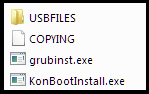
Here, run the “KonBootInstall.exe” executable and it should show you something like this:

As you can see, it enlists all the USB drives connected to your computer, so double-check the drive letter of the USB stick that you just connected, and type the letter, and press Enter. In my case, the USB device was the drive D:, so I put “D” (without the quotations) and pressed Enter, and then this is what you’ll see:
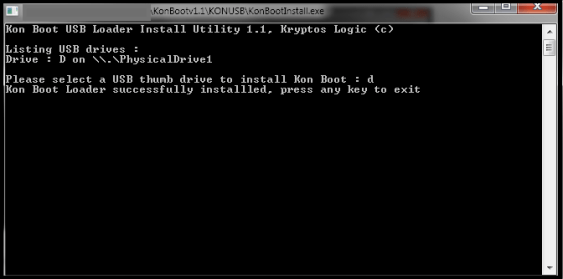
You’re basically done! Press any key and the CMD window will now exit automatically.
Step 4: Test this USB stick on the “friend’s” computer
Shut your “friend’s” computer down, and plug the USB stick into it.
Then turn the computer on, and repeatedly press whatever the key responsible for bringing up the booting menu is (ESC, DEL, F9, F2, F10, CTRL + F12, etc. depending on the manufacturer), and you should get a menu that looks something like this:

Here, you have to select to boot from the USB stick that you have plugged into the computer. So select that specific USB drive and press Enter. A beautiful Kon-Boot logo will generate itself sequentially on your screen, and then a menu will appear. All you have to do is simply press Enter once again. It should now boot up into Windows.
Step 5: Moment of truth – The login screen
Now, you’ll be greeted with the Windows Login screen once again, asking you for the password. But this time, this screen just doesn’t matter. You can enter anything into the password field, and press Enter, and you’ll be logged in. You’ve done it! Now get your “homework” back and shut his computer down after you’re done.
Method 2: Copy-pasting the necessary files [Manual]
Use this method for computers with restrictions on running unknown programs, like school computers with a “Student” account and no administrator privileges.
Step 1: Download the tool required
You’re going to need the KonBoot tool for this, which you can download from here.
There are newer versions of KonBoot available (v2.4, v2.5, v2.7, etc.), but they will require you to format the USB stick and don’t have any significant changes from v1.1, so I recommend using this version itself.
After the download is complete, extract the .RAR file anywhere you like and you’ll now have the folder “KonBootv1.1” there.
Step 2: Plug the USB stick in
Take the USB stick which you want to turn into the portable bypass tool, and plug it into your computer.
Step 3: Copy-paste the necessary files onto the USB stick
Now, moving on to the folder “KonBootv1.1” that you had extracted earlier. Open it, you’ll find the following content in it:
Enter the “KONUSB” folder, and you’ll find the following content:
Enter the “USBFILES” folder, you’ll find the following content:

Now, copy all 3 of these files and paste them in the main directory of your USB stick, that is, not in any folder, directly in the USB stick. You can choose to make them hidden later if you want, but it is essential that you keep it in the USB stick’s root.
You’re basically done!
Step 4: Test this USB stick on the “friend’s” computer
Shut your “friend’s” computer down, and plug the USB stick into it.
Then turn the computer on, and repeatedly press whatever the key responsible for bringing up the booting menu is (ESC, DEL, F9, F2, F10, CTRL + F12, etc. depending on the manufacturer), and you should get a menu that looks something like this:
Here, you have to select to boot from the USB stick that you have plugged into the computer. So select that specific USB drive and press Enter. A beautiful Kon-Boot logo will generate itself sequentially on your screen, and then a menu will appear. All you have to do is simply press Enter once again. It should now boot up into Windows.
Step 5: Moment of truth – The login screen
Now, you’ll be greeted with the Windows Login screen once again, asking you for the password. But this time, this screen just doesn’t matter. You can enter anything into the password field, and press Enter, and you’ll be logged in. You’ve done it! Now get your “homework” back and shut his computer down after you’re done.
Fixing / Reversing the Effects
All that you have done is temporary. So, in order to put the login back to its original state with the previous password, just reboot the computer. This will reverse everything you have done.
 The Computer Noob
very interesting. Thank you
LikeLike
Best found
LikeLike
amazing
LikeLike
Thanks Really Cool.
LikeLike
Thanks-a-mundo for the blog article. Fantastic.
LikeLike
I truly appreciate this blog post.Thanks Again. Keep writing.
LikeLike
There’s noticeably a bundle to know about this. I assume you made certain good factors in features also. Thanks
LikeLike
its superb as your other posts : D, appreciate it for posting.
LikeLike
wow, awesome blog post.Thanks
LikeLike
awesome blog article
LikeLike
Thanks for the blog.Really looking forward to read more.
LikeLike
This is one awesome article.Really looking forward to read more. Will read on…
LikeLike
Major thanks for the post.Really looking forward to read more. Will read on…
LikeLike
After reading your post, you have a great website with interesting content. Keep up the quality work!
LikeLike
A round of applause for your article.Really thank you! Cool.
LikeLike
cool AF
LikeLike
Muchas gracias
LikeLike
Thank you for your blog.Really looking forward to read more. Keep writing.
LikeLike
Fantastic article post.Really looking forward to read more. Fantastic.
LikeLike
Thanks for sharing, this is a fantastic article.Really looking forward to read more. Really Cool.
LikeLike
You have observed very interesting points! ps decent web site.
LikeLike
so much great information on here, : D.
LikeLike
some really fantastic posts on this web site, appreciate it for contribution.
LikeLike
AWESOME! THANKS
LikeLike
Spot on with this write-up, I actually assume this web site wants far more consideration. I’ll in all probability be once more to learn far more, thanks for that info.
LikeLike
I really liked your article post. thanks
LikeLike
wow, awesome blog.Thanks Again. Fantastic.
LikeLike
Very neat blog article.Thanks Again. Will read on…
LikeLike
SWEET!!!
LikeLike
Very informative blog. Keep writing.
LikeLike
Thanks for sharing, this is a fantastic blog article.Thanks Again. Really Great.
LikeLike
Thanks again for the article post.Really looking forward to read more.
LikeLike
“Thank you for your blog.Much thanks again. Cool.”
LikeLike
Thank you, I have recently been searching for information about this subject for ages and yours is the best I have discovered so far
LikeLike
Really appreciate you sharing this blog article.
LikeLike
I value the article post.Really looking forward to read more. Fantastic.
LikeLike
After reading your post, you have a great website with interesting content. But I think you can improve your current google ranks by using SEO website traffic net. My friend uses it and it works great. Just google it, it’s very nice tool to bring you a lot of new readers on a daily basis. Keep up the quality work!
LikeLike
Great blog post.Really thank you! Cool.
LikeLike
Awesome.
LikeLike
Im thankful for the article post.Really looking forward to read more. Fantastic.
LikeLike
A round of applause for your blog article.Much thanks again. Will read on…
LikeLike
“Great post.Much thanks again. Really Great.”
LikeLike
A big thank you for your blog.Really looking forward to read more. Really Great.
LikeLike
Have you ever considered publishing an e-book or guest authoring on other sites? I have a blog centered on the same subjects you discuss and would really like to have you share some stories/information. I know my audience would appreciate your work. If you are even remotely interested, feel free to shoot me an email.
LikeLike
of writing i am as well delighted to share my know-how here with colleagues.
LikeLike
I am generally new to blogging and I truly appreciate your site content. This fantastic article has really peaks my interest. I’m going to bookmark your web blog and keep checking for first time info
LikeLike
I just like the helpful info you provide to your articles. I’ll bookmark your blog and check once more right here frequently. I’m relatively sure I will be informed plenty of new stuff right here! Best of luck for the following!
LikeLike
outstanding
LikeLike
Black on black in the Charg I’m creepin’ Rub me the right way, you might get a genie B.o.B, black Houdini
LikeLike
Great weblog here! Also your site rather a lot up fast! What host are you using? Can I am getting your affiliate hyperlink for your host? I want my web site loaded up as quickly as yours lol
LikeLike